


Withdrawal at NICEPH: Limits, GCash, Maya & Cash-Out Steps
Withdrawal at NICEPH is built around a simple idea: Money must be in the correct wallet, the receiving account must already be linked, and the amount must fit the cashier limits before a request can go through. GCash and Maya make the process familiar, but most cash-out problems still begin with one overlooked detail.
For anyone using Niceph, understanding the withdrawal flow before pressing Submit saves more time than repeatedly retrying a failed request. The important numbers are easy to see; the harder part is knowing which balance is actually withdrawable and which account details need to match.
Withdrawal Starts With the Central Wallet
A winning balance inside a slot game is not always the same as money ready for withdrawal.
This distinction matters. A player can finish a session with a positive balance in a game such as JILI’s Super Ace or PG Soft’s Mahjong Ways 2, return to the cashier, and still see little or nothing under Available Amount. The money may simply still be sitting inside the game wallet.
Inside the Withdrawal section, two balances deserve attention:
- Central Wallet: The main account balance held outside individual games.
- Available Amount: The amount currently eligible to be entered into a withdrawal request.
Before doing anything else, bring funds back from the game lobby and use Refresh Balance. If the available amount changes after refreshing, the issue was not the payment method at all; the funds were simply in the wrong place.
A visible game balance and a withdrawable balance are not automatically the same thing. Check Available Amount before troubleshooting GCash, Maya, or the transaction password.
That single habit prevents a surprisingly common mistake: Trying to cash out money that has not yet returned to the main wallet.
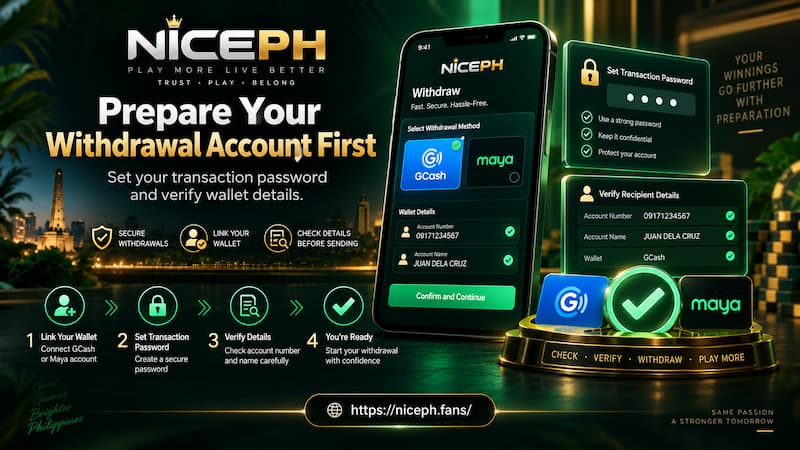
Prepare Your Withdrawal Account First
A smooth withdrawal normally depends on two things already being set up: The receiving wallet and the transaction password.
Waiting until after a large win to check them creates unnecessary pressure. It is much easier to confirm the details while the account is quiet.
Prepare Your Withdrawal Account First
Set a Transaction Password
The Transaction Password is used when confirming financial actions such as withdrawal. Treat it separately from the normal login password.
A practical setup is simple:
- Use a password you can remember without making it obvious.
- Avoid copying your normal account password.
- Do not send it through Messenger, Telegram, SMS, or chat.
- Never give it to someone claiming they can “speed up” a withdrawal.
- If it stops working, resolve the password itself rather than guessing repeatedly.
The field appears directly above the Submit button in the withdrawal cashier, so it becomes the final confirmation before a request is sent.
Link GCash or Maya Carefully
GCash and Maya are available as withdrawal choices. The important part is not merely selecting one; it is making sure the saved recipient details are correct.
When adding an account, check:
- The payment method is the one you actually use.
- The account or mobile number is entered correctly.
- The account holder information is accurate.
- The wallet is still active and accessible.
- The saved account is the one you intend to receive the withdrawal.
One wrong digit can turn a routine cash-out into a support case. For that reason, account setup deserves more attention than the Submit button.
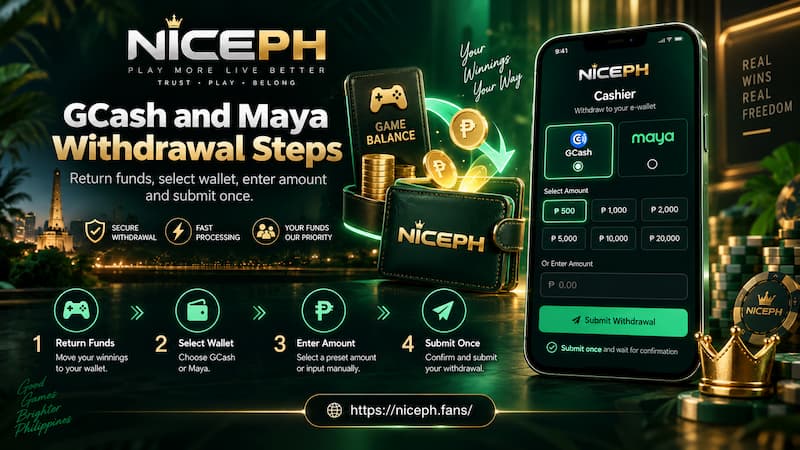
GCash and Maya Withdrawal Steps
Once the balance and wallet are ready, the actual withdrawal sequence is short.
GCash and Maya Withdrawal Steps
1. Return Funds From the Game
Finish the active game session and move the balance back to the Central Wallet when necessary.
For example, suppose you stop playing JILI Super Ace with ₱6,400 remaining in the game wallet. Opening Withdrawal immediately may not make that full amount available. Return the funds first, then refresh the cashier balance.
2. Open Withdrawal and Check Available Amount
Do not choose an amount based on what you remember winning. Read the Available Amount shown inside the cashier.
If it says ₱5,700, trying to withdraw ₱6,000 will not become possible simply because another part of the account previously displayed a higher figure.
This is the balance that should drive the decision.
3. Select GCash or Maya
Choose the withdrawal method connected to the correct receiving account.
If GCash is already saved and still active, there is usually no benefit in changing the wallet immediately before a withdrawal. A last-minute account change creates one more detail that can be mistyped or mismatched.
4. Enter the Withdrawal Amount
The cashier currently provides preset amounts including:
- ₱100
- ₱300
- ₱500
- ₱800
- ₱1,000
- ₱2,000
- ₱5,000
- ₱10,000
- ₱15,000
- ₱20,000
The displayed withdrawal range is ₱100 to ₱20,000 per request.
That makes a ₱7,500 cash-out different from the preset buttons above. Use the amount field where available rather than assuming only the displayed buttons can be chosen.
5. Enter the Transaction Password
Check the amount once more, then enter the transaction password.
This is a good moment to verify three things in one pass:
- Correct wallet
- Correct amount
- Correct available balance
6. Submit Once and Check Recent Withdrawal
Press Submit once.
If the request does not instantly disappear from view or funds do not arrive immediately, avoid creating several duplicate requests. Open Recent Withdrawal first and check whether the transaction has already been recorded.
Repeated submissions do not make processing faster. They can make it harder to tell which request is active.
Withdrawal Limits and Daily Request Count
The withdrawal cashier currently displays a range of ₱100–₱20,000 and also shows Remaining Number of Withdrawal Today: 20.
Those numbers describe different things.
The ₱20,000 figure is the displayed maximum amount for one withdrawal request. The number 20 refers to the remaining count of withdrawals shown for that day.
They should not be treated as one combined rule.
For example, seeing “20 withdrawals remaining” does not automatically mean every account can withdraw ₱20,000 twenty times without any other conditions applying. Account status, wallet limits, balance availability, promotion terms, and payment-channel restrictions may still affect individual requests.
It helps to separate withdrawal limits into three layers:
Available Balance
This is the amount currently available to cash out from the account.
Per-Request Limit
The cashier currently displays ₱100 as the minimum and ₱20,000 as the maximum withdrawal amount.
Number of Requests
The withdrawal screen can also display how many requests remain for the day.
A player planning to withdraw ₱38,000, for example, should think in terms of multiple eligible requests rather than searching for a single ₱38,000 option. Before splitting a larger cash-out, check the current cashier values again because payment limits can change.
Common Withdrawal Problems
Most failed withdrawals are easier to diagnose when each part of the request is checked separately.
Available Amount Is Too Low
This often means funds are still inside a game.
Return them to the Central Wallet and press Refresh Balance before trying again.
GCash or Maya Details Are Wrong
Check the mobile or account number digit by digit. Also confirm that the selected saved wallet is the intended recipient.
If an old Maya number remains saved after you have changed accounts, choosing it from habit can create an avoidable problem.
Transaction Password Is Rejected
Do not immediately assume there is a withdrawal-system problem. The financial password may simply be incorrect.
Re-enter it carefully. If you no longer know it, use contact to reach NICEPH support instead of making repeated guesses.
Bonus or Turnover Requirements Are Incomplete
A normal cash balance and a promotional balance may not follow identical withdrawal conditions.
If the money came from a deposit bonus, free credit, cashback campaign, or another promotion, check the active turnover requirements before withdrawing. Completing a game session does not automatically mean every promotional condition has been completed.
This is especially important after accepting a bonus shortly before requesting a cash-out.
The Payment Channel Is Temporarily Unavailable
GCash and Maya can occasionally experience maintenance or transaction interruptions independently of the casino account.
If the balance is correct, the wallet details are correct, and the request still cannot proceed, check whether the receiving wallet is operating normally before editing account information unnecessarily.