


Deposit at NICEPH: Methods, Limits, Steps and Key Checks
Deposit at NICEPH starts inside the cashier, where GCash, Maya, GCashQR, GCASHPAY2, GrabPay and Online Banking sit side by side. The important part is not simply choosing a familiar logo. Check the active channel, amount, promotion choice and payment instructions before money leaves your wallet.
NICEPH Deposit Methods
Deposit menu at Niceph gives several ways to fund an account without forcing everyone through the same payment route. That matters in the Philippines, where many users move money through e-wallets rather than relying only on traditional bank transfers.
The available Deposit choices currently include:
- GCash
- Maya
- GCashQR
- GCASHPAY2
- GrabPay
- Online Banking
- USDT
Each method leads to its own payment flow. The best choice is usually the one you already use regularly and can easily track afterward.
GCash and Available Channels
GCash is one of the most straightforward Deposit choices for anyone who already keeps a balance in the wallet. Selecting GCash opens several active channels, including:
- G-Cash Ch.20
- G-Cash Ch.27
- G-Cash Ch.17
These channel names are payment routes inside the cashier. They should not be treated as separate GCash products or assumed to have different speeds unless the cashier specifically states otherwise.
If G-Cash Ch.20 is available today, for example, it makes more sense to follow the instructions generated for that transaction than to reuse payment information from G-Cash Ch.27 that you used earlier.
Treat every new Deposit as a separate transaction. Old QR codes, recipient details or previous payment instructions should not be assumed to remain valid.
That simple habit prevents one of the easiest payment mistakes to avoid.
Maya, QR, GrabPay and Online Banking
Maya is also available and may display a Cashback 2% label in the Deposit menu. Treat that as a current cashier offer rather than a permanent feature. Before choosing it because of the cashback, confirm that the label is still active and check whether any conditions apply.
GCashQR suits users who prefer scanning a code rather than moving through a direct wallet flow. GCASHPAY2 provides another GCash-related cashier route when available, while GrabPay is useful if your funds are already sitting in the Grab ecosystem.
Online Banking makes more sense when you want to fund directly from a bank instead of transferring money to an e-wallet first.
The practical rule is simple: Use the payment method that lets you complete and verify the Deposit with the fewest unnecessary transfers.
Deposit Limits and Amount Selection
The selected GCash Deposit route currently displays a minimum of ₱100 and a maximum of ₱50,000.
That range should be read as the limit shown for the active GCash route. It should not automatically be applied to Maya, GrabPay or every other method because limits can differ between payment channels.
Preset Deposit Amounts
The cashier provides quick-select buttons for:
- ₱100
- ₱300
- ₱500
- ₱800
- ₱1,000
- ₱3,000
- ₱5,000
- ₱8,000
- ₱10,000
- ₱20,000
There is also a custom Deposit field.
That custom field is useful when the amount you want is not one of the presets. A ₱2,500 Deposit, for instance, does not require several smaller transactions just because there is no ₱2,500 button.
This becomes more important than it sounds. Five separate ₱500 payments create five transactions to track. One ₱2,500 payment creates one.
Before entering an amount, also check your wallet or bank balance. A payment attempt that fails halfway because the available balance is slightly lower than the Deposit amount only creates unnecessary confusion.
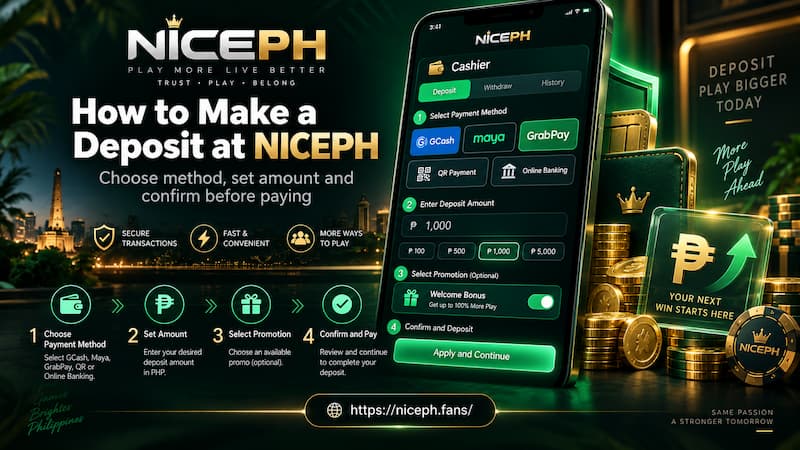
How to Make a Deposit at NICEPH
A clean Deposit flow should be deliberate. There is no benefit in racing through the cashier.
- Login to your NICEPH account.
- Open the Deposit section.
- Select GCash, Maya, GCashQR, GCASHPAY2, GrabPay or Online Banking.
- If GCash is selected, choose one of the currently active G-Cash channels.
- Pick a preset Deposit amount or enter a custom value.
- Check that the amount stays within the limit shown for that payment route.
- Review the promotion section.
- Select an eligible promotion or choose Do not participate in any promotions.
- Press Apply for Deposit.
- Follow the payment instructions generated for that transaction.
- Complete the payment in your wallet or banking app.
- Return to your NICEPH account and check the balance or Deposit History.
How to Make a Deposit at NICEPH
Check the Details Before Paying
Most preventable Deposit mistakes happen after the user has already chosen the correct payment method.
For example, you may select GCash correctly but send the wrong amount. Or you may intend to make a plain Deposit, then accidentally attach a bonus that comes with turnover conditions.
Before confirming, check three things together:
- Payment route
- Deposit amount
- Promotion selection
It takes a few seconds and gives you a much cleaner record if you later need to trace the transaction.
Deposit Bonus or No Promotion
NICEPH gives Deposit users an important choice: A payment can be connected to a promotion, or it can be made without one.
The cashier currently includes a First Deposit Bonus (1/1) area and a separate option marked Do not participate in any promotions.
The second option deserves attention. A bonus should be chosen because its conditions suit how you intend to use the balance, not simply because a bonus box appears before payment.
Check the Bonus Conditions First
Before attaching a promotion to a Deposit, look for details such as:
- Minimum qualifying Deposit
- Bonus value
- Turnover or wagering requirement
- Eligible games
- Contribution rates
- Withdrawal conditions
- Promotion expiry time
Imagine depositing ₱1,000 because you mainly want to play a few short slot sessions and withdraw any remaining balance later. A bonus with a significant wagering requirement may change that plan completely.
On the other hand, a user already planning a longer session may find the same promotion useful.
Neither choice is automatically better. The useful choice is the one that matches what you intend to do with the money.
If the First Deposit Bonus is greyed out or cannot be selected, do not assume it will activate automatically after payment. Check the current promotion status instead.
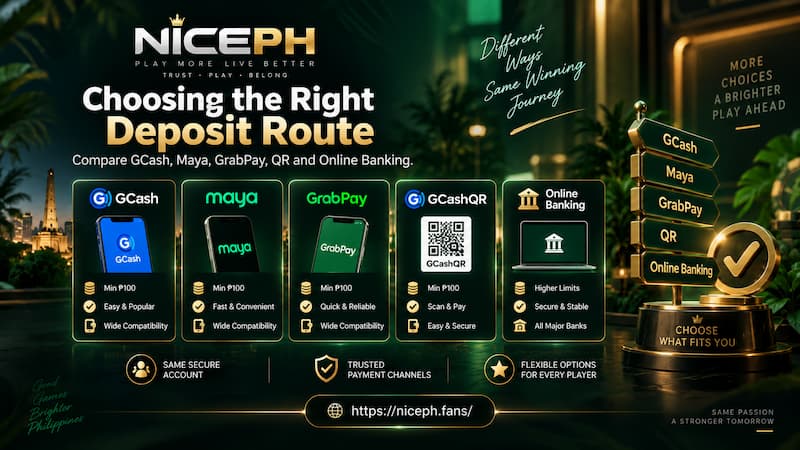
Choosing the Right Deposit Route
There is no single Deposit method that fits every account. The more useful comparison is based on how you normally handle money.
Choosing the Right Deposit Route
GCash
GCash is practical when your wallet is already funded and a working channel is available. It also keeps the Deposit separate from your main bank account, which can make personal transaction tracking easier.
Maya
Maya works well for existing Maya users. If the Cashback 2% label is active, read the associated terms before choosing the method purely for the cashback.
GCashQR
GCashQR is a sensible alternative when you are comfortable scanning and confirming QR payments. Pay attention to the amount displayed before authorizing the payment.
GrabPay
GrabPay avoids an extra transfer if you already maintain a balance there. Moving money from GrabPay to another wallet first would add another step without necessarily improving the Deposit process.
Online Banking
Online Banking is better suited to users who prefer direct bank funding. It can also be convenient when the intended Deposit is larger than the amount normally kept in an e-wallet.
A useful comparison includes more than speed. Check:
- Current availability
- Minimum and maximum amount
- Your own wallet or banking limits
- Promotion compatibility
- Ease of keeping a payment receipt
- Whether you prefer a QR, wallet or bank flow
Deposit History and Pending Payments
The Deposit History button becomes most valuable when a payment does not appear immediately.
The wrong response to a missing balance is often to make the same Deposit again. That can turn one uncertain transaction into two.
Suppose you send ₱3,000 through GCash. The wallet confirms the payment, but the NICEPH balance has not changed yet. Instead of sending another ₱3,000, check Deposit History first.
Look for:
- Deposit amount
- Payment method
- Transaction time
- Current status
- Wallet or banking receipt
- Transaction reference number
When a Deposit Is Not Credited
Use a simple sequence:
- Confirm that money actually left your wallet or bank.
- Open Deposit History.
- Match the Deposit amount with your payment receipt.
- Check whether the transaction is pending or still processing.
- Avoid creating another payment while the first remains unresolved.
- Save the receipt and reference number.
- Contact NICEPH support if the payment is completed but the balance remains uncredited.
Saving the receipt may feel unnecessary when a payment works instantly. It becomes extremely useful the moment a transaction needs to be traced.
Deposit Checklist Before Confirming
A Deposit is easier to manage when the important decisions are made before pressing Apply for Deposit.
Check the following:
- The correct payment method is selected.
- The active channel matches the transaction you are about to complete.
- The Deposit amount is correct.
- The amount is within the displayed limit.
- The promotion choice is intentional.
- Current payment instructions are being used.
- No earlier Deposit is still unresolved.
- A receipt or reference number can be saved after payment.
The strongest Deposit routine is not complicated: Choose the route, confirm the amount, decide on the promotion, complete the current payment instructions and keep a record until the balance is credited.